Work, not just words.
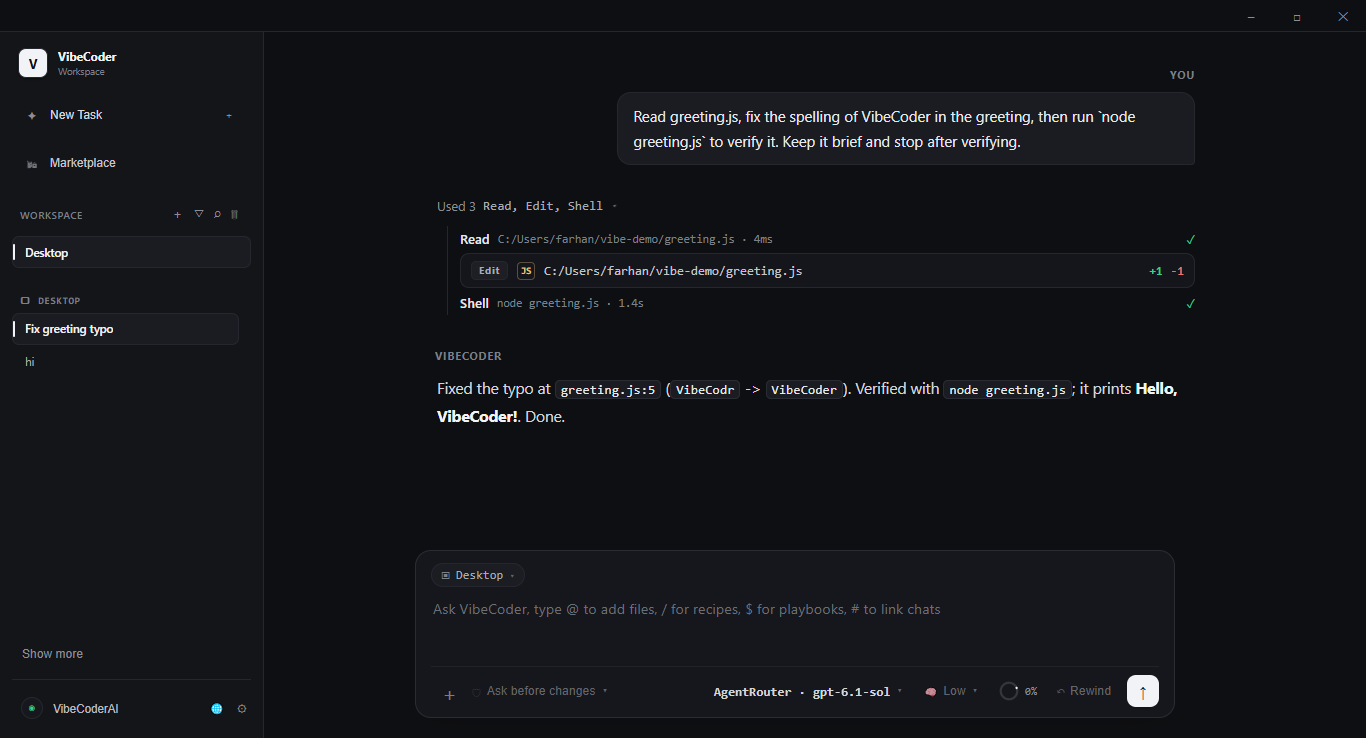
Your agent can inspect a project, edit files, run commands, and check its work. See the actions behind the answer.
✓ Plan → Edit → Run → Verify
 VibeCoder AI
A desktop workspace where an AI agent plans, writes, runs and tests your code — then opens your app and clicks through it to check the result. Start with free models, or bring any provider you like.
Windows 10 / 11 · Free models included · Or bring your own API key
A little less friction.
A lot more building.
Works with OpenAI · Anthropic · Google Gemini · DeepSeek · OpenRouter · Groq · Vercel AI Gateway · Kilo · AgentRouter · Agnes and any OpenAI-compatible API
Big idea or small fix. Start with a conversation.
An illustrative preview. No model requests, files, or API keys are used here.
Multiple providers. Automatic fallback. Real tools. You stay in control.
Meet your new workflow ↓From intent to implementation
Keep the conversation, code, and tools together. Make progress without losing the thread.
Your agent can inspect a project, edit files, run commands, and check its work. See the actions behind the answer.
Connect compatible providers with your own API key. Choose the model that fits the task, or chain several into a fallback model that keeps answering when one provider stops.
Review permissions, follow live tool output, stop a run, and rewind supported file changes. Stay part of the process.
The real app
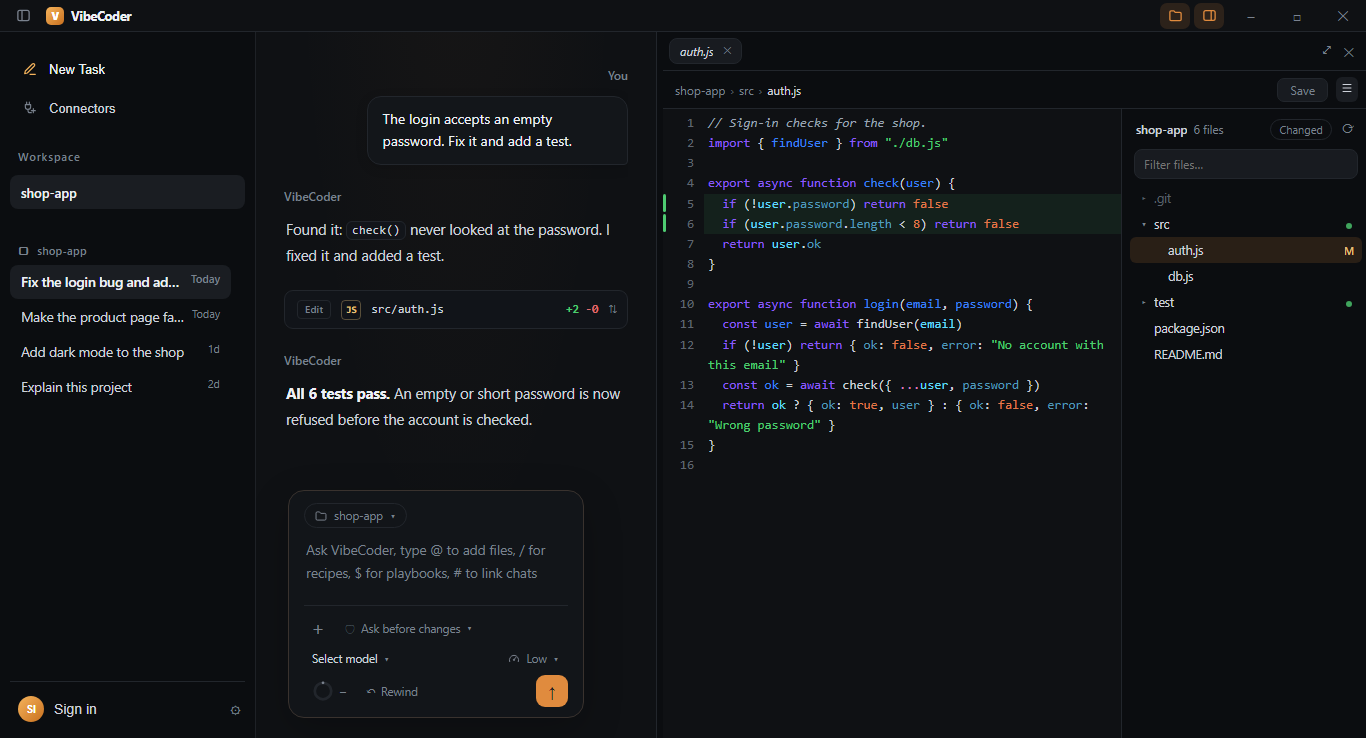
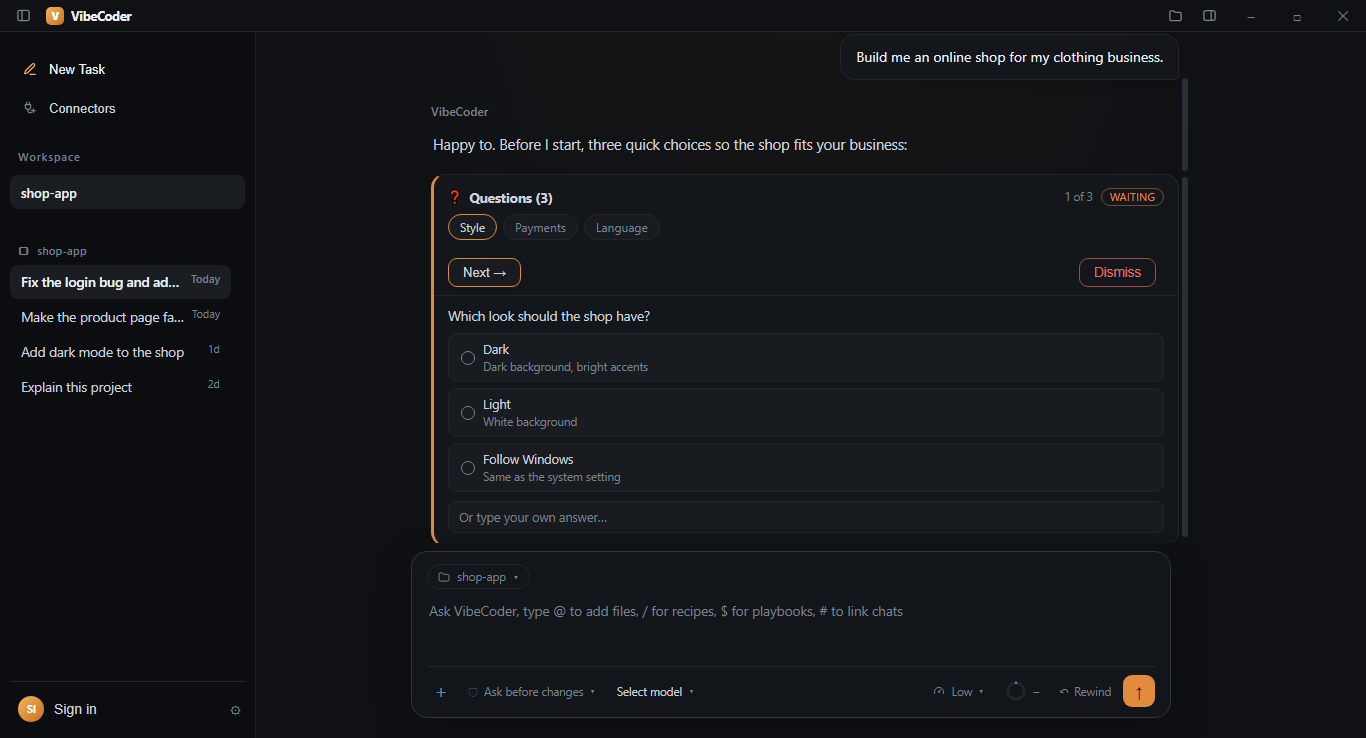
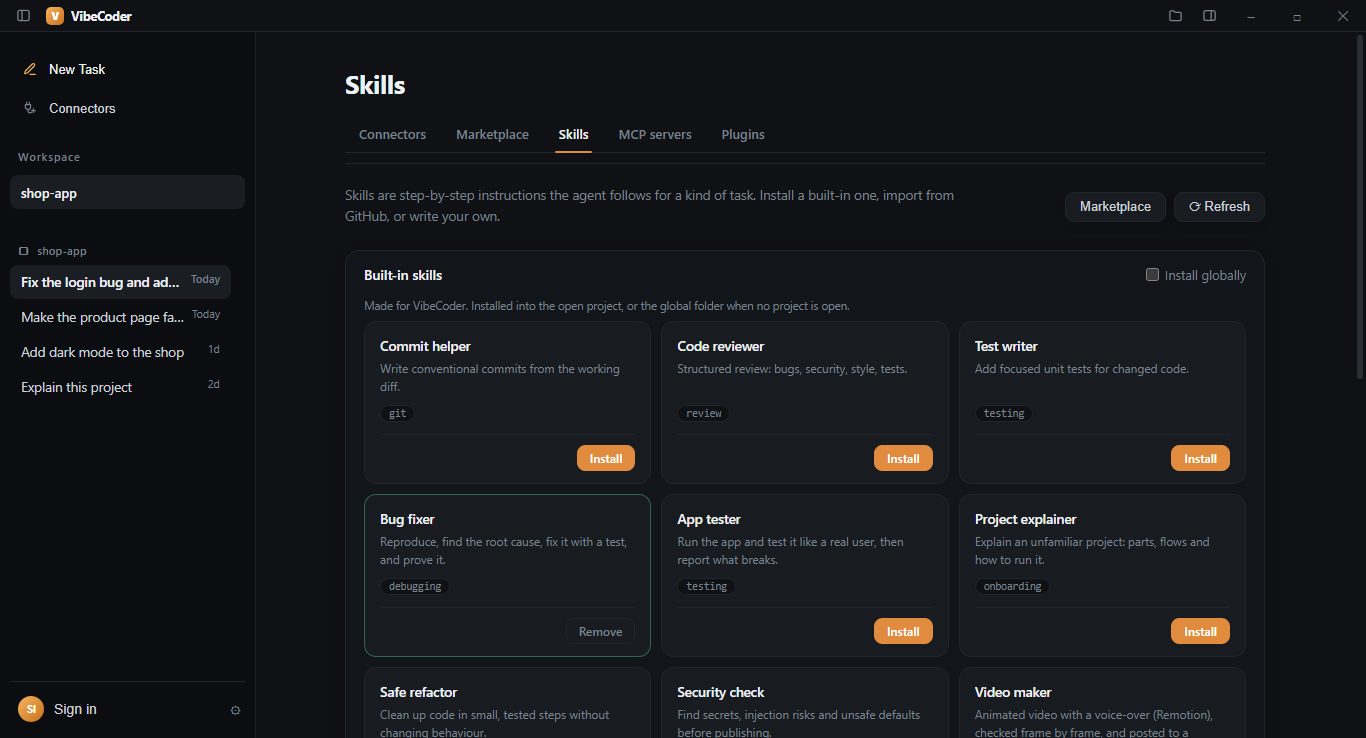
Real screenshots from VibeCoder AI on Windows. Every step the agent takes stays visible.
New in VibeCoder 0.3.20
The chat now glides instead of jumping, files open in a real editor on the right, and ready-made skills, MCP servers and plugins are one click away.
Answers appear already formatted while they stream and the chat glides to each new line, without bouncing. Scroll up to read while the agent is still writing: the chat stays where you are until you come back down. Three dots show the agent is working, and a soft light sweeps across the step that is running.
Click a file name in the chat and it opens on the right with the agent’s changes marked. Edit and save it yourself, open several files as tabs, and browse the project with a filter and git status. The side-panel button opens Changes, Browser and Files.
Seven new skills — bug fixer, app tester, project explainer, safe refactor, security check, docs writer and video maker — plus Playwright, Context7 and Sequential thinking servers, and plugins for a project overview, TODOs, .env checks, local ports and voice-overs.
The video maker builds animated videos with a free offline voice-over from the voices in Windows. With the Facebook connector the agent can post videos, Reels and photos, edit or delete posts, hide comments, update the Page and reply in Messenger — it always asks before anything public or permanent. Facebook opens for everyone after Meta approves the app.
New · keep working when a provider stops
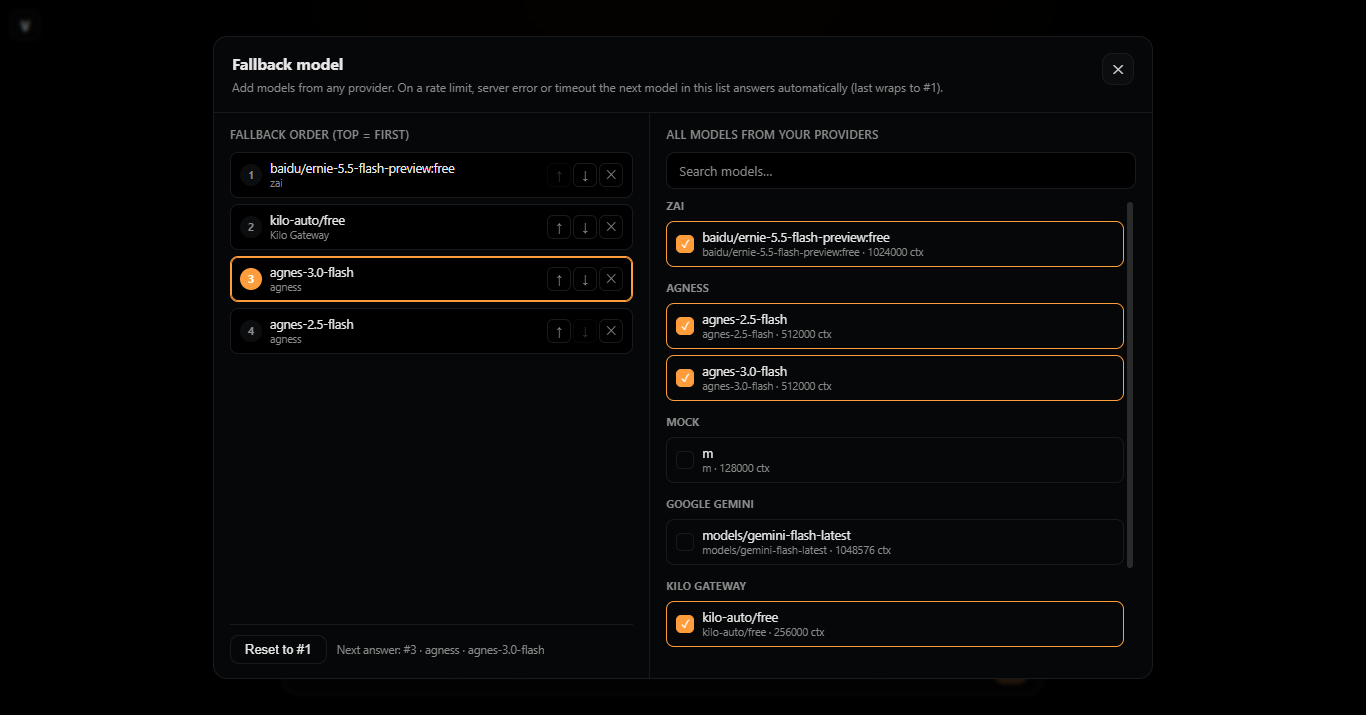
Build an ordered fallback chain from models across different providers. VibeCoder moves to the next model automatically, remembers the position, and wraps back to #1 at the end.
New · also in your terminal
The VibeCoder CLI runs the same engine, providers, sessions and tools in a full-screen terminal workspace. Mouse-wheel scrolling, clipboard paste, saved Full Access and provider management work without opening the desktop app.
vibe provider.✳ VibeCoder AI · cloudfire / preview-model · Full Access You Add a settings page and wire the save button. VibeCoder I’ll inspect the routes, add the page, then run the tests. ✓ read renderer/routes.js ✓ edit renderer/settings.js +84 −6 ✓ shell npm test 12 suites passed Enter send · Ctrl+J newline · Ctrl+V paste · F4 access
Make yourself at home
One account for your download and free models.
Your own provider whenever you want more.
Create your website account with a Google sign-in. No extra password to remember.
Install VibeCoder AI on Windows. Existing installations can also update inside the app.
Sign in with VibeCoder in the app for free models, or add any provider’s API key. Then open your project and describe what you want.
Sign in with VibeCoder in the app to use free models with a daily request limit. They are powered by third-party AI providers that may use free-model prompts to improve their models, so never send secrets or private code there. For bigger work, connect your own provider’s API key — that provider bills its own usage.
A few things to know
Not to start. Sign in with VibeCoder inside the app and a “VibeCoder AI” provider with free models appears (daily request limit; the free models may change). For heavier work, add an API key from a compatible provider such as OpenAI, Anthropic, Google Gemini, DeepSeek or OpenRouter — that provider bills its own usage.
The current release is for Windows 10 and Windows 11, 64-bit. macOS and Linux installers are not currently available. We do not list platforms as supported before a release is ready.
Google sign-in creates your VibeCoder website account for downloads. In the desktop app or CLI, “Sign in with VibeCoder” links to that account to unlock the free models; usage and connected apps are on your profile page, where you can disconnect them. It never grants access to your Google Drive or other Google data.
The desktop agent works with your local project. When you use a model, relevant prompts and project context are sent to your selected provider. Review that provider’s data policies, and never share secrets in a prompt.
Yes. The public GitHub release feed stays available for the desktop updater. Website sign-in does not block existing installations from checking, downloading, or installing updates.
Use our public GitHub issue tracker at github.com/jhfarhanyt20-coder/VibeCoder-AI/issues. Describe the problem, include your desktop or CLI version, and never paste API keys, tokens or private code.
Start free today. Bring your own model whenever you like.
Get VibeCoder AI ↗Products
Free to download from our official GitHub releases. Every app is open to look at on GitHub.
Windows desktop app
The AI workspace that plans, writes, runs and tests your code — with your own models or free VibeCoder models.
Loading more products…
VibeCoder AI in your terminal
The CLI is a full VibeCoder workspace for the terminal: the same engine, tools, sessions, providers, permissions and subagents. Open your project, talk to the agent, follow every command, and review the diff — without leaving the terminal.
Node.js 20 or newer · Windows, macOS and Linux terminals · Works alongside the desktop app
  ✳ VibeCoder AI   ·   cloudfire / preview-model   ·   Full Access

  You
  Add a settings page and wire the save button.

  VibeCoder
  I’ll inspect the routes, add the page, then run the tests.

  ✓ read   renderer/routes.js
  ✓ edit   renderer/settings.js   +84 −6
  ✓ shell  npm test   12 suites passed

  Enter send · Ctrl+J newline · Ctrl+V paste · F4 access
Start in a minute
Download once, install globally, and open the workspace in any project folder.
Get the official VibeCoder-CLI-latest.tgz from our GitHub release. No account or API key is needed to download it.
Requires Node.js 20+. Run the command in the folder where you saved the package.
npm install -g ./VibeCoder-CLI-latest.tgzStart the full-screen workspace from your project, or attach to the app that is already running.
cd path/to/your-project
vibe
Everything the app can do
The CLI is not a reduced mode. It calls the same SDK and tool registry as the desktop app.
New, resume, rename, export and pick sessions. Switch agents and personas, load skills and recipes, and follow subagent work live.
sessions · agents · skills · recipesRead and edit files, run commands, inspect diffs, rewind a turn or a step, and see background shell output as it happens.
tools · shell · rewind · usagePermission prompts, hard Locks, question forms and audit history all work here. Saved Full Access only skips routine tool prompts.
permissions · locks · formsManage MCP servers, plugins, skills, marketplace entries and extension lifecycle from the same stores the desktop app uses.
MCP · plugins · marketplaceRun vibe attach to control the visible browser in the running desktop app — tabs, pages and screenshots, not a headless copy.
Use plain text, NDJSON or JSON output, --yes, --json and one-shot runs for scripts and CI. No new dependencies.
Providers, without the app
Add, list, test and remove providers inside the CLI. Keys stay encrypted in the local store.
Choose the API format, give the provider an ID, base URL and model, then paste the API key. The wizard validates the values and supports keyless local endpoints such as Ollama.
vibe provider add
vibe provider list
vibe provider key
vibe provider test
vibe provider models
vibe provider remove
Built-in providers cannot be removed. Only custom providers can be deleted, together with their saved key.
Type /provider for the same manager as a menu. Use /model to switch models and /auth add <provider> for a masked key prompt.
/provider
/model
/auth add cloudfire
/access
The API key never appears in the transcript or in a shell command.
Command reference
These are the commands you will use most. Run vibe help for the complete surface.
vibeOpen the full-screen chat workspace in the current folder.vibe chat -C <folder>Open a workspace for a specific project folder.vibe run "…"Run one prompt to completion. Add --json or --yes for automation.vibe attachShare the running desktop engine, including its browser and live sessions.vibe sessionsList, resume and inspect existing sessions.vibe provider …Add, remove, key, test, list and inspect providers.vibe modelsList configured providers and models without exposing keys.vibe serveRun the HTTP/SSE host for remote clients and long-running work.vibe computer on|offComputer Use: let the agent see the screen and use mouse and keyboard. Ctrl+Alt+Esc stops it.vibe connectors github connectSign in to GitHub for the agent with one click.Inside the workspace: Ctrl+P commands, Tab completion, ↑/↓ history, Ctrl+J newline, Ctrl+V paste, F4 or the access label for permissions, and the mouse wheel to scroll.
If something goes wrong
Most first-run issues are about the provider key, the Node version, or attaching to a different engine.
Configure a provider first: run vibe provider add or vibe auth add <provider>, then try vibe models. The key is stored locally and encrypted; it is never written to the transcript.
Check the provider’s API base URL and format. vibe provider test <id> asks the endpoint for its model list, which confirms the URL and key before a paid prompt is sent.
The browser lives in the desktop app. Start VibeCoder AI, then run vibe attach in the same workspace so the CLI can use the open browser. A standalone session cannot silently attach to another process.
Use the CLI package from the same release as the desktop app. Mixing versions is not supported because the CLI and desktop share session, provider and settings formats.
Talk to us
Found a bug, have a complaint about the service, or want a feature? Open a public issue in our GitHub tracker. Include the VibeCoder version, what you expected, what happened, and any error text. Please do not paste API keys, tokens or private source code.
Your next build starts here
Get the latest VibeCoder AI desktop app and make your next idea a reality.
VibeCoder AI does not provide a hosted model API or model credits. Connect your own provider inside the desktop app.
Sign in to access your desktop download.
By continuing, you agree to our Terms and acknowledge our Privacy notice.
Sign in with Google to connect the desktop app to your VibeCoder account.
Continue with GoogleAllow to use VibeCoder with ?
The app can use your free VibeCoder models and daily quota. You can disconnect it anytime from your profile.
Your profile
Signed in with GoogleVibeCoder will offer its own model provider. When it launches, your plan, usage and API keys will appear here. For now, connect your own provider inside the desktop app.
Free models for the VibeCoder desktop app. In the app, choose Sign in with VibeCoder to connect it.
Resets daily at 00:00 UTC.
No app is connected yet.
Free models are being prepared. Check back soon.
Windows 10 / 11 · 64-bit installer
Download for Windows ↓